

Queues Management
Discover how to configure inbound calls to reach agents through a queue in Cloud PBX, and choose how the queue rings its agents.
A queue of agents is another option that can be used instead of configuring inbound calls to reach a specific agent or a group of agents. When an IVR sends a caller to a queue, the caller waits in the queue and the queue offers the call to its agents according to the queue's ring strategy, until one of them answers.
You can access this functionality in Settings > Inbound Configurations > Queues Management.
To use a queue, create it (give it a name, choose a ring strategy and a ring time, and assign agents to it), and then add it to an existing or new IVR with the Enter queue element.
Queues list
The Queues Management tab lists all queues of your account.
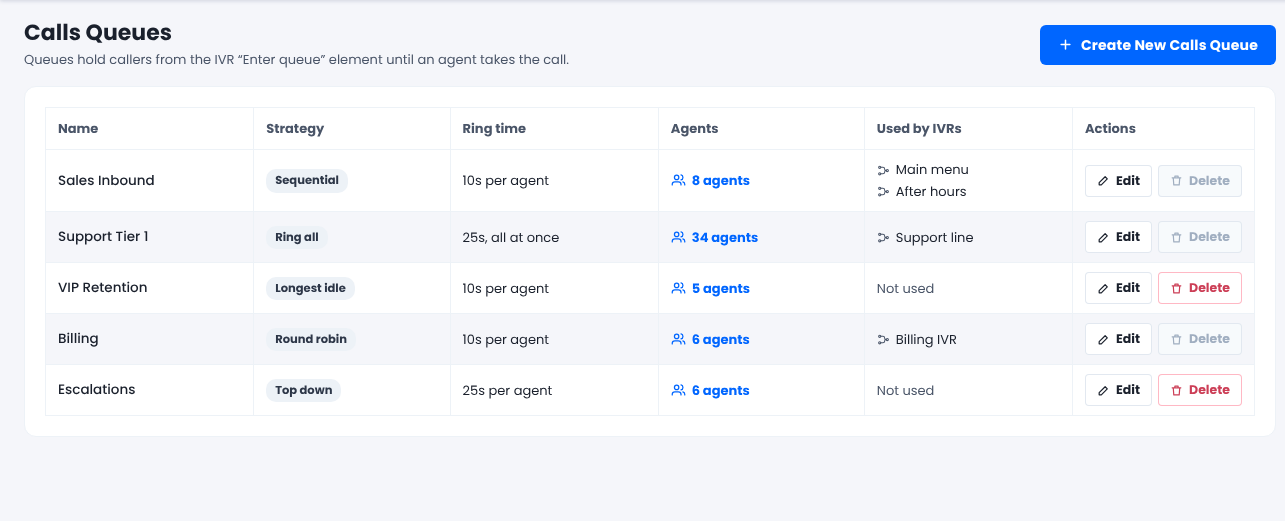
Queues Management list
| Column | Description |
|---|---|
| Name | The name of the queue. |
| Strategy | The queue's ring strategy. Hover over it to see a short description. |
| Ring time | How long each agent rings, for example 10s per agent. For Ring all, it shows all at once. |
| Agents | The number of agents in the queue. Click it to see their names. |
| Used by IVRs | The IVRs that send callers to this queue, or Not used. |
| Actions | Edit or Delete the queue. |
NoteYou can't delete a queue that an IVR uses. Remove it from the IVR first, and then delete it. Deleting a queue doesn't affect its agents or your IVRs.
Create or edit a queue
Open the queue page
Click Create New Calls Queue, or click Edit next to an existing queue.
Name the queue
Enter a Name for the queue. This field is required.
Choose a ring strategy
In Ring strategy, select how the queue offers calls to its agents. New queues use Sequential by default. See Ring strategies below.
Set the ring time per agent
In Ring time per agent (seconds), enter how long each agent rings before the queue tries the next one. The default is 10 seconds, and you can enter any value from 5 to 120. With Ring all, this is how long all agents ring together.
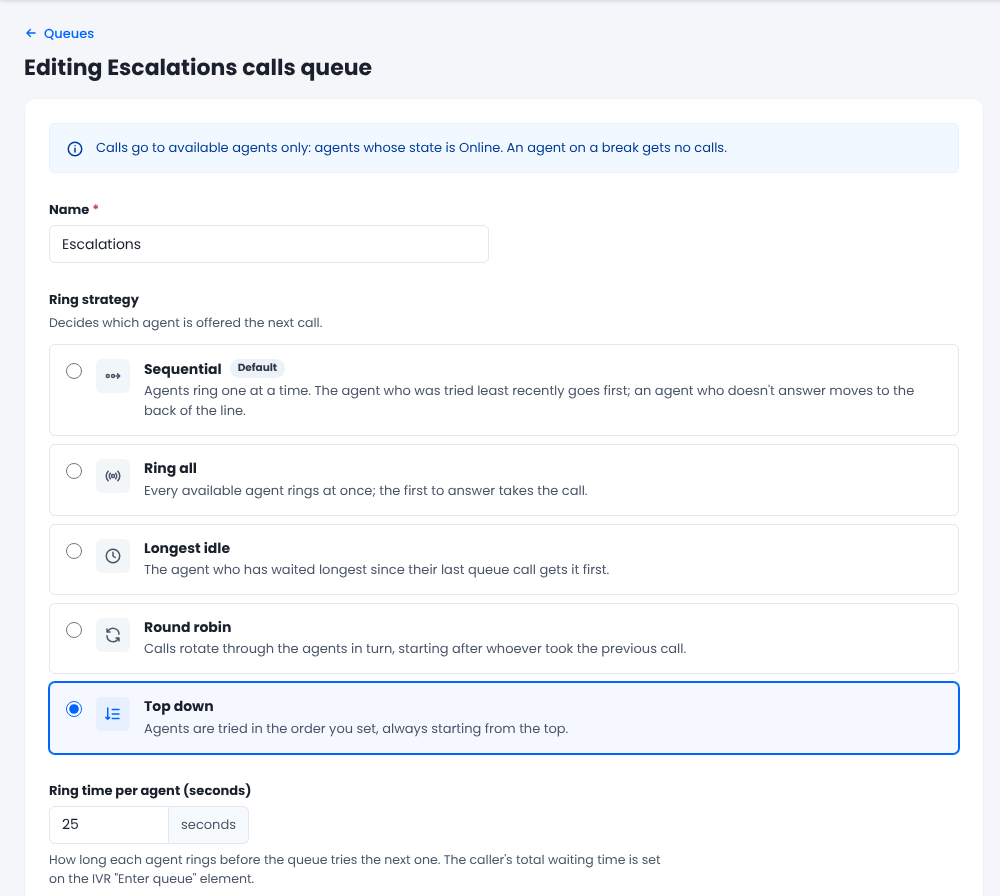
Queue settings
Add agents
In Agents, add users from Available users to In this queue. Use the search box to find users by name or extension, or click Add all / Remove all.
For Top down and Round robin, set the agent order in In this queue: drag a row, or use the arrows. Agent 1 is at the top.
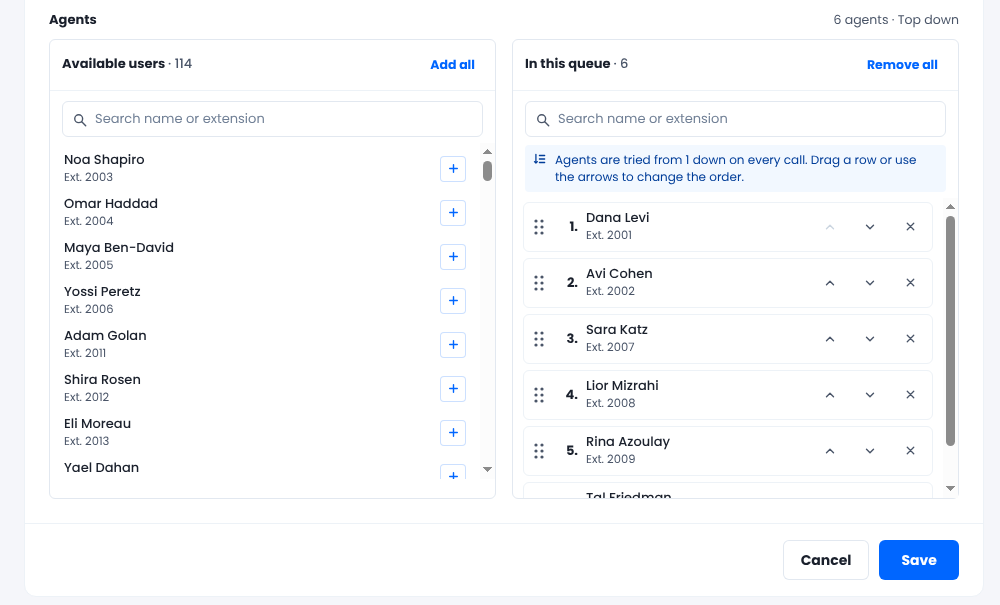
Agents and agent order
NoteTo reorder agents, clear the search box first.
Save
Click Create (new queue) or Save (existing queue).
WarningThe caller's total waiting time is not set on the queue. It's the Timeout of the Enter queue element in your IVR. The ring time only sets how long each agent rings before the next one is tried.
Ring strategies
The ring strategy decides which agent's phone rings first, and what happens when that agent doesn't answer.
| Strategy | How it works | Uses the agent order | Good for |
|---|---|---|---|
| Sequential (default) | Agents ring one at a time. The agent who was tried least recently goes first, and an agent who doesn't answer moves to the back of the line. | No | Small teams where everyone should get a fair share without you managing an order. |
| Ring all | Every available agent's phone rings at once. The first to answer takes the call, and the other phones stop ringing. | No | The shortest possible wait, for example a sales line where any agent can help. |
| Longest idle | The agent whose last queue call ended longest ago rings first, then the next longest, and so on. An agent who never had a queue call goes first. | Only to break ties | Spreading the work evenly, so nobody takes call after call while a colleague is idle. |
| Round robin | Calls rotate through the agents in the order you set, starting after whoever took the previous call. After the last agent, it wraps to the top. | Yes | Taking turns in a fixed order. |
| Top down | Every call starts with agent 1, then agent 2, and so on down the list. | Yes | A clear priority, such as a senior agent who takes calls first and others who back them up. |
In every strategy, if nobody answers, the queue goes round again until someone answers or the caller's total wait (the Enter queue timeout) runs out.
Examples
All the examples use a ring time of 10 seconds and three agents in this order: Anna, Ben, Chloe.
- Sequential: Anna was tried least recently, so her phone rings first for 10 seconds and she doesn't answer. She moves to the back of the line. Ben's phone rings for 10 seconds and he doesn't answer. Chloe answers after 6 seconds. The caller waited 26 seconds.
- Ring all: Anna's, Ben's and Chloe's phones ring at the same moment. Ben answers after 4 seconds, and the other two phones stop ringing.
- Longest idle: their last queue calls ended at 9:40 (Ben), 9:55 (Chloe) and 10:05 (Anna), so the order is Ben, Chloe, Anna. Ben doesn't answer, and Chloe answers. On the next call, Chloe rings last.
- Round robin: Ben took the previous call, so the next call starts with Chloe. Chloe answers, so the call after that starts with Anna.
- Top down: every call starts with Anna, no matter who answered before.
Note
- Idle time for Longest idle counts queue calls only, across all queues of your account. A call that isn't a queue call doesn't reset it.
- For Round robin, if the agent who took the previous call is no longer available (for example, on a break or logged out), the rotation starts again from the top of the list.
- Existing queues have no saved agent order until you save them once. Until then, agents are ordered by the order in which they were created as users. For example, if an existing queue has Chloe (created first), Anna and Ben, a Top down call starts with Chloe until you open the queue, set the order to Anna, Ben, Chloe and click Save.
Who gets queue calls
A queue offers calls only to available agents. An agent is available when all of these are true:
- The user is active (not deactivated or deleted).
- The agent's state is Online.
WarningAn agent on a break, or in any state other than Online, gets no queue calls.
If no agent is available, the caller hears hold music until an agent becomes available or the Enter queue timeout runs out. Then the IVR continues to the next element.
Use the queue in an IVR
Add the queue to an IVR with the Enter queue element. For details, see Guide to IVR Elements.
- Timeout: the caller's total waiting time in the queue. When it runs out, the IVR continues to the alternate path.
- Search type: decides which agents the queue uses:
- Online Only: assigns calls to agents who are actively online.
- Online + Offline: includes agents registered via softphone, extension, or WebRTC.
When changes take effect
- Within about 1 minute: adding or removing agents, and changing the strategy or the ring time. This applies to new callers and to callers who are already waiting.
- Immediately: an agent going on a break. A ring that has already started finishes, and after that the agent is skipped until they are Online again.
FAQ
Where do I set the agent order?
On the queue page, under Agents > In this queue. Drag a row or use the arrows. The order is used by Top down and Round robin, and only to break ties in Longest idle.
Does the ring time change how long a caller waits in total?
No. The total wait is the Timeout of the IVR Enter queue element. The ring time only sets how long each agent rings before the next one is tried.
What strategy do my existing queues use?
Sequential with a ring time of 10 seconds, with the same agents as before. You can change this at any time.
Updated 5 days ago