

Rating Calls
Report call issues and rate connection quality both during and after a conversation in full and mini modes of the standalone CommPeak Softphone.
The Call Rating feature enables CommPeak Softphone users to report problems encountered during calls and rate the connection quality after the conversation ends.
Your reports help the CommPeak team quickly address issues and enhance your connection experience.
Full mode:
- To use the feature while you are talking, click the Trouble during the call? link, select one or more suggested options, and then click Submit.
Submitting feedback: full mode
- Sometimes, after you finish your conversation, you will see the How was the call? popup. Here, you can rate your connection quality from 1 to 5 and report call issues by selecting one or more suggested options.
Submitting feedback through How was the call? popup: full mode
Starting from Softphone v6.2.15, the feedback form also shows the current Enabled/Disabled status of TURN, STUN, and Noise Suppression. The indicators help you check your network and audio settings before reporting an issue: toggling them in Audio Settings often resolves quality problems right away.
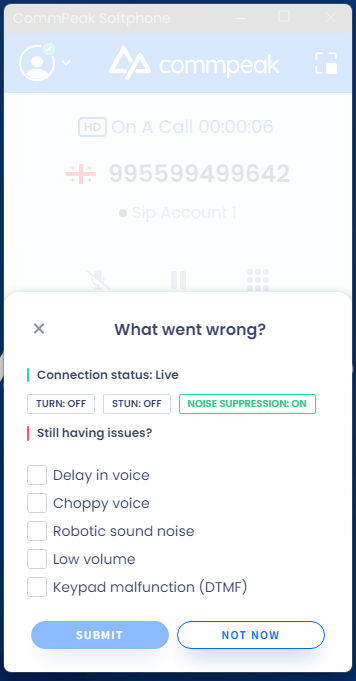
"Trouble during the call?" form with the status indicators
Mini mode:
Rating after a call is also available in the mini mode.

Submitting feedback through How was the call? popup: mini mode

Submitting feedback: mini mode
NOTECommPeak administrators can manage the call rating feature for agent calls in the settings of CommPeak Dialer or Cloud PBX.
Updated 14 days ago