

OTP Service
Define a single OTP endpoint that delivers one-time passwords across SMS, WhatsApp, and Voice with shared rate limits and a configurable failover chain.
An OTP configuration defines a failover chain across SMS, WhatsApp, and Voice. Each configuration exposes a single unified API endpoint with its own API token, rate limits, and per-channel templates.
IMPORTANTThis page replaces the legacy SMS-only OTP streams. The previous SMS OTP configuration is no longer available in the interface.
Accessing OTP configurations
To open the OTP Service > Configurations page:
-
Log in to TextPeak in your browser.
-
Click OTP Service > Configurations in the main menu on the left.

OTP Service > Configurations menu tab
-
The Omnichannel OTP Configurations page opens. It lists all configurations you've created.
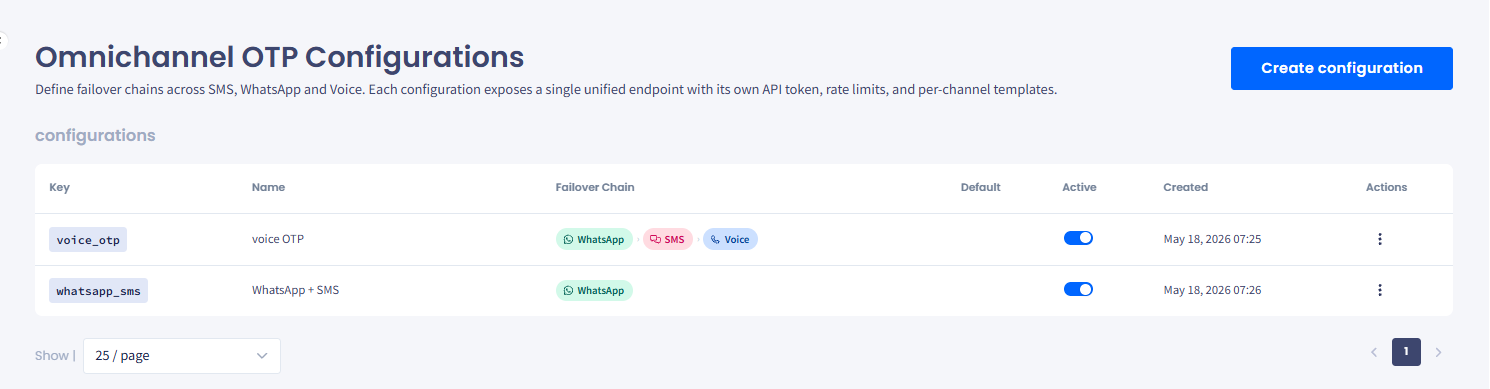
Omnichannel OTP Configurations page
Refer to the following table for column descriptions.
| Column | Description |
|---|---|
| Key | The unique key you pass in API requests to select this configuration. |
| Name | The configuration name, used for identification in the interface. |
| Failover Chain | A summary badge showing the primary channel in the configuration's failover order. |
| Default | Indicates whether this configuration is the default for OTP requests that don't specify a key. |
| Active | Toggle to activate or deactivate the configuration without deleting it. |
| Created | Date and time the configuration was created. |
| Actions | Click the three-dot icon to show and copy or reset the configuration token, edit, or delete the configuration. |
Creating, managing, and viewing OTP services
To create, edit, or deactivate a configuration, see Creating OTP Configurations.
The other two pages under OTP Service provide detailed analytical data on the service:
- OTP Analytics reports how many one-time passwords you requested, how many were delivered, and how many were verified, broken down by channel and by country, with volume and rates plotted over time. Filter by date range, channel, and country, and group the series by day, week, or month.
- OTP Request Log lists every send attempt, newest first, with Attempts showing one row per failover attempt and Requests grouping them per verification.
Updated 28 days ago