

Conversation Events Webhooks
Learn how to send a webhook when something happens in an Inbox conversation, choose the events, and read the request body.
A Conversation events webhook sends a request to your endpoint whenever something happens in a TextPeak Inbox conversation, such as a customer reply, an assignment, or a new tag. Use it to update your CRM or helpdesk, alert a team, or record conversation activity in your own database.
Events you can receive
When you set up the webhook, you choose which of these events it sends.
| Event | type | Sent when |
|---|---|---|
| Conversation started | conversation.started | A new conversation starts. |
| Customer replied | conversation.customer_replied | The contact sends a message. |
| Agent replied | conversation.agent_replied | An agent sends a message. |
| Internal note added | conversation.note_added | An agent adds an internal note. |
| Assigned | conversation.assigned | The conversation is assigned. |
| Unassigned | conversation.unassigned | The conversation is unassigned. |
| Closed | conversation.closed | The conversation is closed. |
| Reopened | conversation.reopened | A closed conversation is reopened. |
| Tag added | conversation.tag_added | A tag is added to the conversation. |
| Tag removed | conversation.tag_removed | A tag is removed from the conversation. |
Creating a conversation events webhook
Open Webhook Management
In the main TextPeak menu, expand Webhooks and click Management.
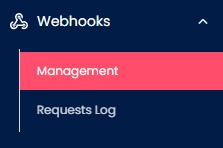
Webhooks > Management tab
Add a webhook
Click Add webhook. The Create new webhook page opens.
Name the webhook
In Webhook name, enter a name that helps you find the webhook later.
Select the trigger
In Trigger, select Conversation events.
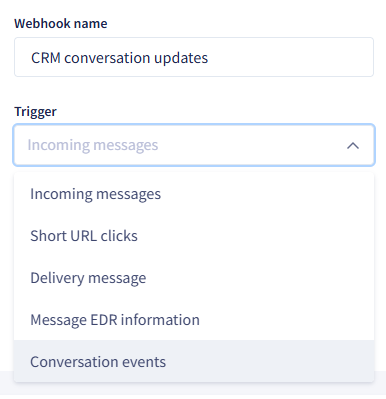
Trigger list
Choose the events
Under Events to send, select each event you want to receive. Request Preview stays empty until you select at least one event.
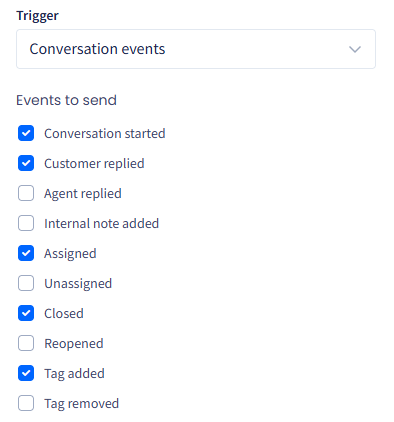
Events to send
Limit it to streams
Optionally, in Filter Stream, select the channels the webhook covers, such as a WebChat or WhatsApp channel. By default, it covers All streams. To select every channel at once or start over, click Select All or Clear All at the top of the list.
Set the endpoint
Under Endpoint Configuration, enter the URL of your endpoint. Conversation events are always sent with POST. If your endpoint expects headers, such as an authorization token, enter a Key and a Value for each, and click Add more to add another.
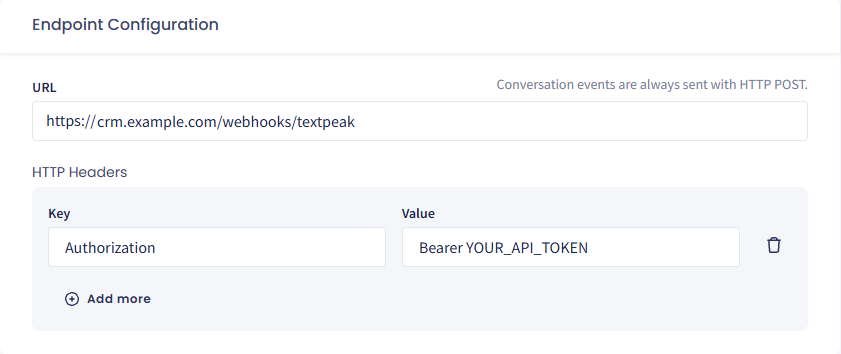
Endpoint Configuration with an authorization header
Check the request body
In Request Preview, select an event in Example for to see the body TextPeak sends for it. The list shows only the events you selected.
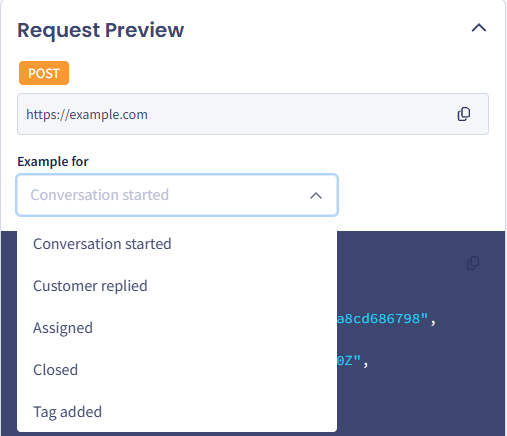
Example for in Request Preview
Create the webhook
Click create webhook.
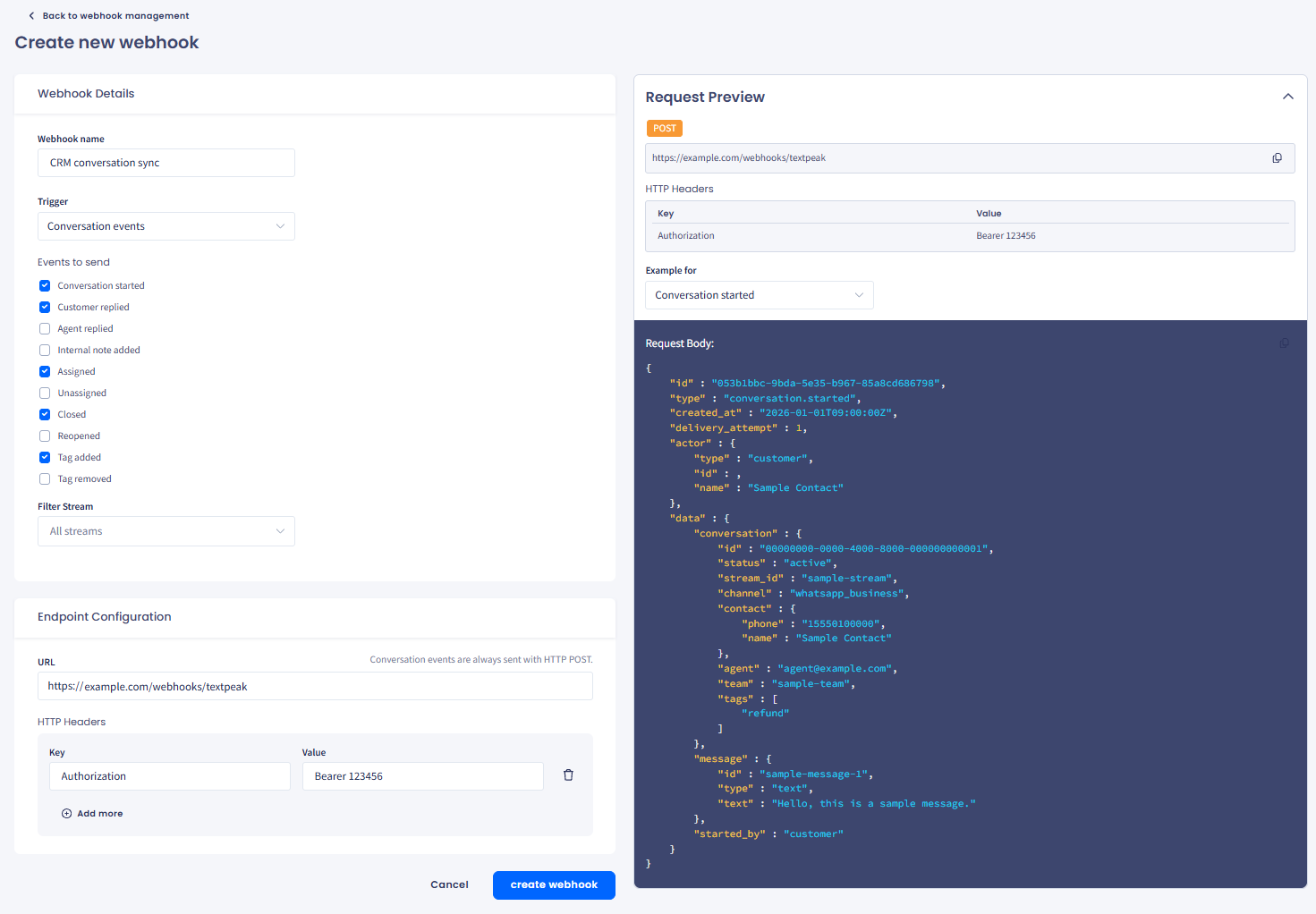
The completed Create new webhook page
To turn the webhook off, test it, edit it, or delete it, see the Working With Webhooks page.
Request body
Every event is sent as a JSON body with the same envelope.
| Field | What it holds |
|---|---|
id | The unique ID of the event. |
type | The event type, for example conversation.started. |
created_at | When the event happened, in UTC. |
delivery_attempt | Which delivery attempt this request is. |
actor | Who caused the event: its type (for example, customer or agent), id (for an agent, their email address), and name. |
data.conversation | The conversation: its id, status, stream_id, channel, contact (phone and name), agent, team, and tags. Tags are sent as tag keys, not tag names. |
Each event adds its own fields to data:
Event type | Fields added to data |
|---|---|
conversation.started | message (the first message: id, type, and text) and started_by |
conversation.customer_replied, conversation.agent_replied | message |
conversation.note_added | note, with the note text |
conversation.assigned, conversation.unassigned | assignment, with kind (for example, agent), from, and to |
conversation.closed | closed_by |
conversation.reopened | reopened_by |
conversation.tag_added, conversation.tag_removed | tag |
Sample bodies by event
Select an event to see the body TextPeak sends for it. These are the samples TextPeak shows in Request Preview. Fields with no value, such as an agent's name or the from of a first assignment, are sent as null.
{
  "id": "053b1bbc-9bda-5e35-b967-85a8cd686798",
  "type": "conversation.started",
  "created_at": "2026-01-01T09:00:00Z",
  "delivery_attempt": 1,
  "actor": {
    "type": "customer",
    "id": null,
    "name": "Sample Contact"
  },
  "data": {
    "conversation": {
      "id": "00000000-0000-4000-8000-000000000001",
      "status": "active",
      "stream_id": "sample-stream",
      "channel": "whatsapp_business",
      "contact": {
        "phone": "15550100000",
        "name": "Sample Contact"
      },
      "agent": "[email protected]",
      "team": "sample-team",
      "tags": [
        "refund"
      ]
    },
    "message": {
      "id": "sample-message-1",
      "type": "text",
      "text": "Hello, this is a sample message."
    },
    "started_by": "customer"
  }
}
{
"id": "053b1bbc-9bda-5e35-b967-85a8cd686798",
"type": "conversation.customer_replied",
"created_at": "2026-01-01T09:00:00Z",
"delivery_attempt": 1,
"actor": {
"type": "customer",
"id": null,
"name": "Sample Contact"
},
"data": {
"conversation": {
"id": "00000000-0000-4000-8000-000000000001",
"status": "active",
"stream_id": "sample-stream",
"channel": "whatsapp_business",
"contact": {
"phone": "15550100000",
"name": "Sample Contact"
},
"agent": "[email protected]",
"team": "sample-team",
"tags": [
"refund"
]
},
"message": {
"id": "sample-message-1",
"type": "text",
"text": "Hello, this is a sample message."
}
}
}{
"id": "053b1bbc-9bda-5e35-b967-85a8cd686798",
"type": "conversation.agent_replied",
"created_at": "2026-01-01T09:00:00Z",
"delivery_attempt": 1,
"actor": {
"type": "agent",
"id": "[email protected]",
"name": null
},
"data": {
"conversation": {
"id": "00000000-0000-4000-8000-000000000001",
"status": "active",
"stream_id": "sample-stream",
"channel": "whatsapp_business",
"contact": {
"phone": "15550100000",
"name": "Sample Contact"
},
"agent": "[email protected]",
"team": "sample-team",
"tags": [
"refund"
]
},
"message": {
"id": "sample-message-1",
"type": "text",
"text": "Hello, this is a sample message."
}
}
}{
"id": "053b1bbc-9bda-5e35-b967-85a8cd686798",
"type": "conversation.note_added",
"created_at": "2026-01-01T09:00:00Z",
"delivery_attempt": 1,
"actor": {
"type": "agent",
"id": "[email protected]",
"name": null
},
"data": {
"conversation": {
"id": "00000000-0000-4000-8000-000000000001",
"status": "active",
"stream_id": "sample-stream",
"channel": "whatsapp_business",
"contact": {
"phone": "15550100000",
"name": "Sample Contact"
},
"agent": "[email protected]",
"team": "sample-team",
"tags": [
"refund"
]
},
"note": {
"text": "This is a sample internal note."
}
}
}{
"id": "053b1bbc-9bda-5e35-b967-85a8cd686798",
"type": "conversation.assigned",
"created_at": "2026-01-01T09:00:00Z",
"delivery_attempt": 1,
"actor": {
"type": "agent",
"id": "[email protected]",
"name": null
},
"data": {
"conversation": {
"id": "00000000-0000-4000-8000-000000000001",
"status": "active",
"stream_id": "sample-stream",
"channel": "whatsapp_business",
"contact": {
"phone": "15550100000",
"name": "Sample Contact"
},
"agent": "[email protected]",
"team": "sample-team",
"tags": [
"refund"
]
},
"assignment": {
"kind": "agent",
"from": null,
"to": "[email protected]"
}
}
}{
"id": "053b1bbc-9bda-5e35-b967-85a8cd686798",
"type": "conversation.unassigned",
"created_at": "2026-01-01T09:00:00Z",
"delivery_attempt": 1,
"actor": {
"type": "agent",
"id": "[email protected]",
"name": null
},
"data": {
"conversation": {
"id": "00000000-0000-4000-8000-000000000001",
"status": "active",
"stream_id": "sample-stream",
"channel": "whatsapp_business",
"contact": {
"phone": "15550100000",
"name": "Sample Contact"
},
"agent": null,
"team": "sample-team",
"tags": [
"refund"
]
},
"assignment": {
"kind": "agent",
"from": "[email protected]",
"to": null
}
}
}{
"id": "053b1bbc-9bda-5e35-b967-85a8cd686798",
"type": "conversation.closed",
"created_at": "2026-01-01T09:00:00Z",
"delivery_attempt": 1,
"actor": {
"type": "agent",
"id": "[email protected]",
"name": null
},
"data": {
"conversation": {
"id": "00000000-0000-4000-8000-000000000001",
"status": "closed",
"stream_id": "sample-stream",
"channel": "whatsapp_business",
"contact": {
"phone": "15550100000",
"name": "Sample Contact"
},
"agent": "[email protected]",
"team": "sample-team",
"tags": [
"refund"
]
},
"closed_by": "agent"
}
}{
"id": "053b1bbc-9bda-5e35-b967-85a8cd686798",
"type": "conversation.reopened",
"created_at": "2026-01-01T09:00:00Z",
"delivery_attempt": 1,
"actor": {
"type": "agent",
"id": "[email protected]",
"name": null
},
"data": {
"conversation": {
"id": "00000000-0000-4000-8000-000000000001",
"status": "active",
"stream_id": "sample-stream",
"channel": "whatsapp_business",
"contact": {
"phone": "15550100000",
"name": "Sample Contact"
},
"agent": "[email protected]",
"team": "sample-team",
"tags": [
"refund"
]
},
"reopened_by": "agent"
}
}{
"id": "053b1bbc-9bda-5e35-b967-85a8cd686798",
"type": "conversation.tag_added",
"created_at": "2026-01-01T09:00:00Z",
"delivery_attempt": 1,
"actor": {
"type": "agent",
"id": "[email protected]",
"name": null
},
"data": {
"conversation": {
"id": "00000000-0000-4000-8000-000000000001",
"status": "active",
"stream_id": "sample-stream",
"channel": "whatsapp_business",
"contact": {
"phone": "15550100000",
"name": "Sample Contact"
},
"agent": "[email protected]",
"team": "sample-team",
"tags": [
"refund"
]
},
"tag": "refund"
}
}{
"id": "053b1bbc-9bda-5e35-b967-85a8cd686798",
"type": "conversation.tag_removed",
"created_at": "2026-01-01T09:00:00Z",
"delivery_attempt": 1,
"actor": {
"type": "agent",
"id": "[email protected]",
"name": null
},
"data": {
"conversation": {
"id": "00000000-0000-4000-8000-000000000001",
"status": "active",
"stream_id": "sample-stream",
"channel": "whatsapp_business",
"contact": {
"phone": "15550100000",
"name": "Sample Contact"
},
"agent": "[email protected]",
"team": "sample-team",
"tags": []
},
"tag": "refund"
}
}Checking the requests TextPeak sent
Every request appears in Webhooks > Request Log, with the time it was sent, the status your endpoint returned, and the trigger. Click View in a row to see the URL and the body TextPeak sent. For details, see the Request Log page.
Updated about 3 hours ago