

Reputation History
Review the results of past number reputation checks, filter the records by number, date, status, tags, or number type, and export them.
The Reputation History page lists the number reputation checks performed for your CommPeak account: the number, the date, the result, and the cost. Use it to see how the reputation of a number changed over time and what the checks cost.
To add numbers or change a check schedule, see Reputation Checks.
Opening Reputation History
On the main menu on the left, navigate to Phone Reputation and select Reputation History. The Phone Number Reputation Check Logs page opens with the checks of the last seven days.
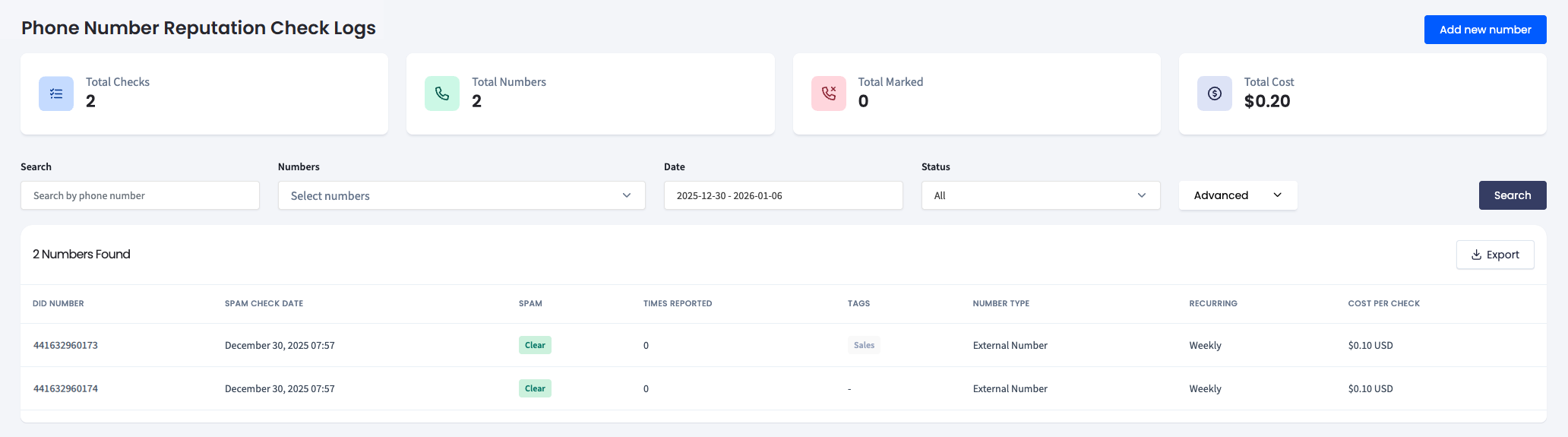
Phone Number Reputation Check Logs page
To start a new check from this page, click Add new number.
Reading the summary
The tiles at the top of the page summarize the records that match the current filters:
| Tile | What it shows |
|---|---|
| Total Checks | The number of checks performed |
| Total Numbers | The number of phone numbers checked |
| Total Marked | The number of checks that returned Marked |
| Total Cost | The total cost of these checks |
Filtering the records
Set one or more filters and click Search:
| Filter | Use it to |
|---|---|
| Search | Find the checks of a specific phone number |
| Numbers | Select one or several numbers from the list |
| Date | Choose the period. The default is the last seven days |
| Status | Show all checks, or only the Marked or Clear results |
| Advanced > Tags | Show the numbers with the selected tags |
| Advanced > Number type | Show only CommPeak DID or External Number records |
Reading the table
| Column | Description |
|---|---|
| DID Number | The phone number that was checked |
| Spam Check Date | The date and time of the check |
| Spam | The result: Clear (not identified as spam) or Marked (identified as spam) |
| Times Reported | How many times the number was reported as spam |
| Tags | The tags assigned to the number |
| Number Type | CommPeak DID or External Number |
| Recurring | The check schedule: Once, Daily, or Weekly |
| Cost Per Check | The price of the check |
Exporting the records
Click Export above the table to download the records as a .csv file.
Updated about 8 hours ago