

Changing Settings
Access CommPeak standalone Softphone's settings to test sound quality, set a ringtone, add SIP accounts, and perform other configurations.
You can test your sound quality, adjust your microphone and headset, set your ringtone and sounds, and configure other settings.
Full mode:
To access the settings, click SETTINGS at the bottom of the screen and select the option you need in the menu that appears.
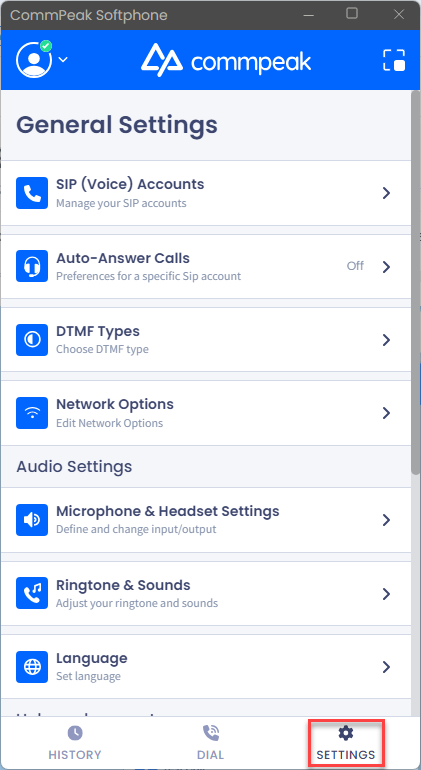
Settings button: full mode
Mini mode:
Click the ellipsis button and then go to Settings in the menu that expands.
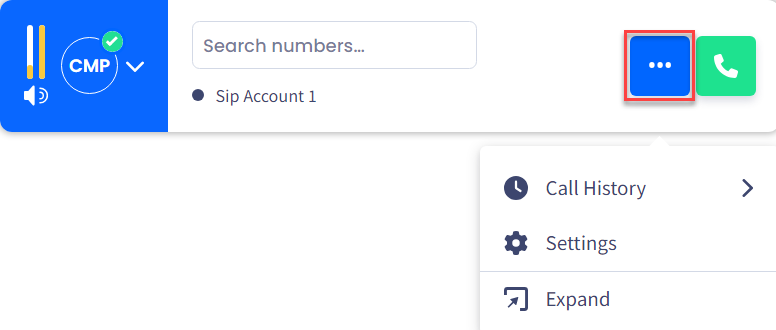
Settings button: mini mode
You can refer to the pages below for detailed descriptions and step-by-step instructions on how to manage the settings of Standalone CommPeak Softphone:
See how to configure the auto-answering feature and DTMF types.
Learn how to change the settings of your input and output sound, adjust your ringtones, and set the application language.
Check the details about the application and its recent updates, your technical data, and directs you to the CommPeak Help Center and product legal information.
Updated 4 days ago