

Inbound Voice Agents
Route inbound callers to an AI bot from your IVR, with a priority fallback chain.
Your voice AI bots can answer inbound calls too - not just the predictive outbound calls covered in the overview. You route an incoming caller to a bot by adding a Connect to AI Agent step to an inbound IVR flow.
Two things to set up
-
Allow the bot flow to take inbound calls. Edit the bot flow and tick Allow inbound calls. Only flows with this enabled can be selected in the IVR step.

-
Add the IVR step. In the IVR (flow) builder for your inbound number, add the Connect to AI Agent step (robot icon) wherever you want the bot to pick up.
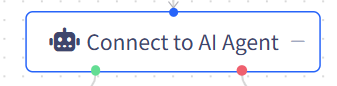
The "connect to AI agent" step
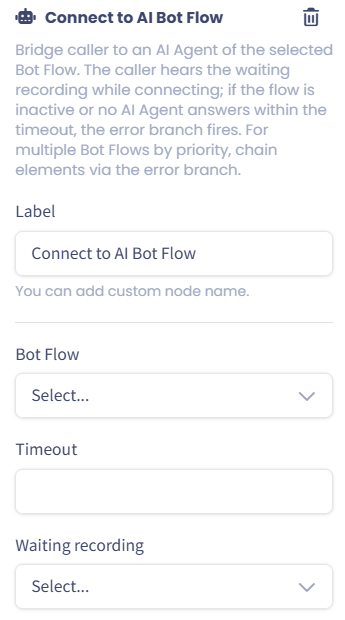
Connect to AI Bot Flow Element under the IVR
| Option | What it does |
|---|---|
| Bot Flow | The bot that answers. Only bot flows with Allow inbound calls enabled appear here |
| Timeout | How long (seconds) to keep trying to connect before giving up |
| Waiting recording | What the caller hears on a loop while the dialer connects them |
The step has two outcomes you connect to the next steps in your flow:
- Success: the caller was connected to the bot
- Failure: the selected flow is inactive, or no AI agent answered within the timeout.
flowchart TD
  A[Inbound call hits your IVR] --> B[Connect to AI Agent step]
  B --> C[Caller hears the waiting recording]
  C --> D{Bot answers within timeout?}
  D -- Yes --> E[Caller connected to the bot]
  D -- No / flow inactive --> F[Failure branch]
The bot knows your callerIf the caller's number matches a lead, the bot is given that lead's context - so it can greet the caller by name and update the lead's disposition at the end of the call. If no lead matches, the call proceeds anonymously.
Offer more than one bot, by priority
To fall back from one bot to another, chain the steps: connect the Failure branch of one Connect to AI Agent step into another one for a different bot flow. The dialer tries them in order, so the chain order is your priority. You can also send the final Failure branch to any other IVR step - for example, a human group or a voicemail.
What happens once the bot answers
An inbound bot call is handled outside your predictive AI capacity:
- It doesn't use a channel. The call is not taken from the bot flow's Channels, and it doesn't count toward your account's AI concurrency limit. Your predictive bots keep dialing as before, even while inbound callers are talking to the same bot flow.
- It shows up on the Realtime page as its own AI agent. For the length of the call, the Realtime dashboard shows an extra agent named aibot-{flow}-incoming-{n} (for example aibot-3-incoming-1), bridged to the caller. These agents exist only while an inbound call is live: the number n counts the flow's concurrent inbound calls, and it's reused once a call ends. You won't find them on the AI Agents page, and you can't clock them in or out.
- Call Records attribute the call to the bot flow, so your AI filters and reports include inbound bot calls like any other AI call.
Why a separate agent?A human agent on an incoming call appears on Realtime as that agent's own card. Inbound bot calls follow the same rule, so you can see every live conversation at a glance without one of your predictive bot seats being blocked.
Handing the caller to a human agent
During the conversation, the bot can decide the caller needs a person. The dialer then looks for a free human agent and connects the caller to them. Because an inbound caller has no campaign or predictive group behind them, the dialer picks the humans through the bot flow's skill groups:
- It takes the skill groups assigned to the bot flow's AI agents.
- It finds every agent group whose priority groups include at least one of those skill groups.
- It searches all of those groups at once. The first free human agent in any of them gets the call.
flowchart TD
  A[Bot decides to transfer] --> B[Skill groups of the bot flow's AI agents]
  B --> C[Every group whose priority groups include one of those skill groups]
  C --> D{Free human agent in any of them?}
  D -- Yes --> E[Caller connected to the first free agent]
  D -- No, within the timeout --> F[Transfer Dropped Call Action runs]
The agent receives the usual incoming-call screen pop, flagged as a handoff from the bot, together with the bot's summary of the conversation when the bot provides one.
Example: the bot flow's AI agents are in the skill group Sales. Group A has a priority group that includes Sales; group B doesn't. The caller can only be transferred to free agents in group A.
While the dialer searches
The Transfer to Human Settings on the bot flow control the wait:
| Setting | What it does |
|---|---|
| Transferring to a human playback | What the caller hears while the dialer looks for an agent. When empty, the caller hears a ringback tone instead |
| Timeout for transferring to a human agent | How long (seconds) to keep searching before giving up |
| Transfer Dropped Call Action | What happens when no agent is free in time: Hangup Call (default), Play file, or Forward call to SIP URI (a phone number or SIP address) |
Things to know
- Campaigns and group filters play no part. Only the bot flow's skill groups and the groups' priority groups decide who can take the call. This is different from outbound, where a transfer goes to the lead's own predictive group.
- A matched lead doesn't change the target. Even if the caller's number matched a lead in one of your campaigns, the dialer still uses the bot flow's groups, not the lead's campaign.
- If no group includes the bot flow's skill groups, nothing happens. The caller simply stays with the bot. Make sure at least one group's priority groups cover the bot flow's skill groups before you rely on handoffs.
- A transferred caller leaves the IVR for good. Neither the Success nor the Failure branch runs after a handoff, even if no agent answers.
✔️ That's it - inbound callers now reach your AI bots, with a clean fallback path when a bot isn't available and a handoff to your human agents when they need one.
Updated 16 days ago