

OTP Request Log
Learn how to trace a single one-time password through the OTP Request Log in TextPeak, and what the difference between sent and delivered means.
The OTP Request Log lists every one-time password (OTP) send attempt on your account, newest first, in a single table you can filter. Use it to trace what happened to one verification, rather than to read the totals that OTP Analytics reports.
Opening the request log
To open the OTP Service > OTP Request Log page:
- Log in to TextPeak in your browser.
- Click OTP Service in the main menu on the left, then click Request Log.
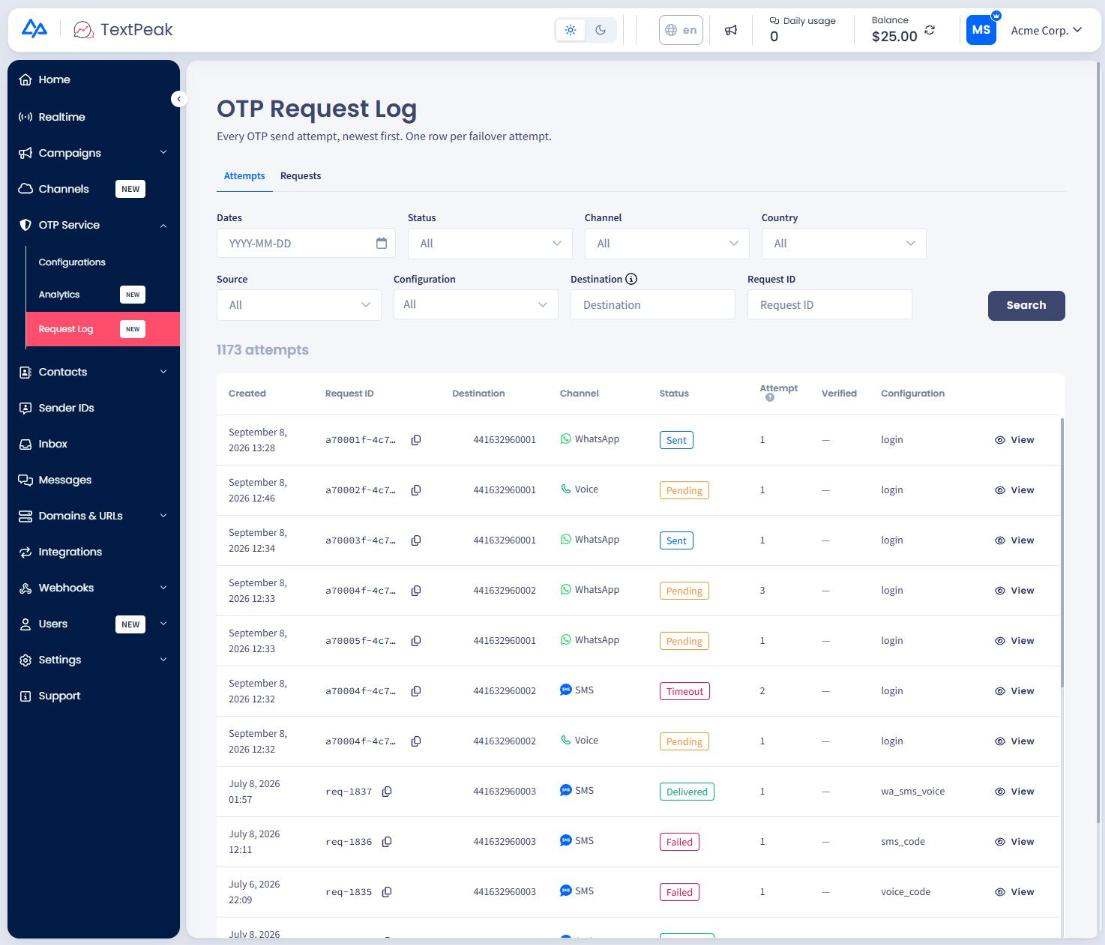
OTP Request Log records
Filtering the log
Use the filters above the table to narrow the list by the options the tab offers, then read the matching rows. The log covers the OTP traffic on your account only.
For the aggregate view of the same traffic, including failure reasons and failover rescue, see OTP Analytics.
Attempts and requests
The log has two tabs, and the difference between them matters when a failover chain is involved.
- Attempts shows one row per send attempt. A request that failed on SMS and then succeeded on WhatsApp appears as two rows.
- Requests shows one row per OTP request, with its attempts grouped underneath it, so you can follow a single verification through the chain from first attempt to final outcome.
TIPStart on Requests when a recipient reports that a code never arrived. It shows the whole chain for that verification in one row, including which channels were tried and in what order.
Statuses
| Status | What it means |
|---|---|
| Sent | The message left the platform and no error came back. |
| Delivered | The operator confirmed the message reached the handset. |
| Pending | The attempt is in progress and no final status has arrived. |
| Failed | The attempt was rejected or could not be delivered. |
| Error | The request could not be processed. |
NOTESent and Delivered are not the same thing. Sent means the message left the platform without an error. Delivered means the operator confirmed receipt. An attempt can stay at Sent because the operator returns no delivery report, not because the message was lost. A handset that is switched off is one of several reasons a report never arrives.
The log also records whether the code was verified, so you can tell a delivered code that the recipient never used from one that completed the verification.
Updated 28 days ago