

Phone Reputation
Check whether the phone numbers you call from are marked as spam, schedule recurring checks, and review the results in the CommPeak Portal.
Phone Reputation shows whether the numbers you use as an outgoing Caller ID are marked as spam. You can check DID numbers purchased from CommPeak and numbers from other providers, once or on a daily or weekly schedule.
In the CommPeak Portal, the Phone Reputation menu has two pages:
- Reputation Checks: add numbers, schedule checks, and manage them one by one or in bulk
- Reputation History: review the results of past checks, with totals and filters.
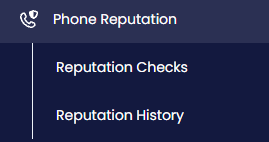
Phone Reputation menu tabs
NOTEEach check has a cost. The Cost Per Check column shows the price for each number, and the Reputation History page shows the total for the records you filter.
The reputation status of your CommPeak DID numbers also appears in the My DIDs table.
Choose a page below to start checking your numbers or to review past results:
Updated about 7 hours ago