

Setting Up a SIP Trunk in FreeSWITCH
This guide provides step-by-step instructions on how to add a SIP trunk in FreeSWITCH.
After signing up with CommPeak and getting your SIP account credentials, your next step is registering your SIP account in CommPeak Softphone, a third-party application, or with your IP phone to make your first call.
TIPYou can also use the Built-in CommPeak Softphone with your JWT-enabled SIP accounts to place calls right from your browser. You can read more in the Built-in Softphone for JWT-Enabled SIP Accounts article.
Video tutorial
TIPWith CommPeak Softphone, you get an enterprise-level tool without installing any third-party software.
IMPORTANTIf you're using third-party SIP clients (not CommPeak's Softphone), you must manually enable SRTP (Secure Real-Time Transport Protocol) when using TLS for SIP transport. This ensures media encryption and compatibility.
This document will guide you on how to add a SIP trunk in FreeSWITCH, also known as a gateway in FreeSWITCH terminology.
Prerequisites
Make sure you have the following:
-
an installed and running FreeSWITCH server
-
a SIP account from CommPeak
The SIP credentials and domain details that you need are available in your account at CommPeak Portal in VoIP Services > SIP Accounts (Trunks): -
User - click the eye icon next tor Username/IP in a SIP account line.
-
Password - click Reset Password if you forgot it.
-
Domain - sip.commpeak.com.
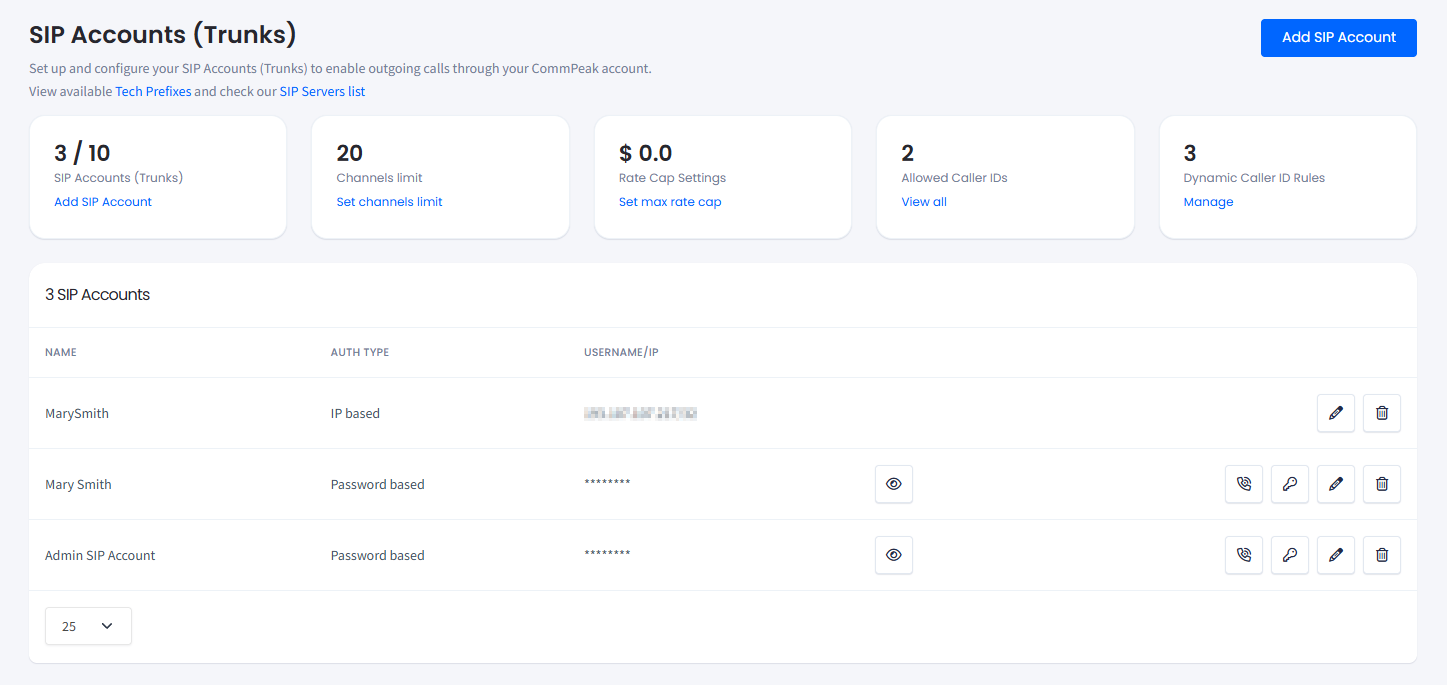
SIP account data in CommPeak Portal
Adding a SIP Trunk
Step 1: Access FreeSWITCH
First, you need to access your FreeSWITCH server. This can usually be done via SSH. Run the command similar to the following:
ssh user@your_freeswitch_server_ipStep 2: Locate SIP profile directory
FreeSWITCH configurations are stored in XML files located under /etc/freeswitch. Navigate to the sip_profiles directory, which contains files for external SIP profiles.
cd /etc/freeswitch/sip_profiles/externalStep 3: Create SIP gateway configuration file
Create the gateway file
Create a new XML file in this directory for your SIP gateway. You can give it any name, e.g., commpeak_gateway.xml.
Open the file
Open the new file using a text editor. Here we're using nano, but you can use your preferred editor:
sudo nano commpeak_gateway.xmlStep 4: Edit SIP gateway configuration file
Add the configuration
In the newly created my_sip_gateway.xml file, include the following configuration:
1. <include><gateway name="commpeak_gateway"> <param name="username" value="yourusername"/> <param name="password" value="yoursecret"/> <param name="proxy" value="sip.commpeak.com"/> <param name="register" value="true"/></gateway></include>Enter your data
Enter the following data in this configuration:
- my_sip_gateway is the name of your SIP gateway
- yourusername is your SIP username
- yoursecret is your SIP password
- sip.commpeak.com is your SIP domain.
Save and exit
Save and exit the file.
Step 5: Reload SIP profile
To apply the changes, you must reload the SIP profile in FreeSWITCH.
Open the FreeSWITCH CLI
Access the FreeSWITCH CLI:
fs_cliReload the SIP profile
Then reload the SIP profile:
reloadxmlsofia profile external rescanStep 6: Verify SIP gateway registration
After reloading, you can verify if the gateway registration was successful by checking the SIP gateways:
sofia status gateway commpeak_gatewayThe status should be REGED if the gateway is registered correctly.
Step 7: Configure dialplan
You'll need to set up your dialplan to use this SIP Gateway. The dialplan in FreeSWITCH controls how incoming and outgoing calls are handled and routed.
Open the dialplan directory
Navigate to the dialplan directory:
cd /etc/freeswitch/dialplanOpen the dialplan file
Open the default.xml file or any specific dialplan file you're using:
sudo nano default.xmlAdd an extension
Add a new extension to route calls to your new SIP gateway. An XML example might look as follows:
<extension name="outbound_to_commpeak_gateway"> <condition field="destination_number" expression="^(\d+)$"> <action application="bridge" data="sofia/gateway/commpeak_gateway/$1"/> </condition></extension>This example contains the following data:
- outbound_to_commpeak_gateway: the extension name
- condition: the field that checks the destination number
- ^(\d+)$: the expression matches any number
- bridge: the action used to connect the call to the SIP gateway
- commpeak_gateway: the name of your gateway
- $1: represents the captured group from the expression (i.e., the dialed number).
Save and exit
Save and exit the file.
Step 8: Reload dialplan
Now you need to reload the dialplan for the changes to take effect. In the FreeSWITCH CLI, execute:
reloadxmlStep 9: Test the SIP gateway
Finally, you can make a test call to verify everything works correctly. You can do this from a registered SIP device (like a Softphone or IP Phone) configured to use your FreeSWITCH server.
Troubleshooting
If you encounter any issues, you can use the FreeSWITCH CLI for troubleshooting by executing the following command:
sofia loglevel all 9It will provide detailed information about SIP communication and allow you to identify any issues.
Updated 6 days ago