

Do You Pass Caller ID? What Method Do You Use?
How CommPeak passes your caller ID on outbound calls, and how caller ID rules decide which number the other side sees.
Answer
Yes. CommPeak passes your Caller ID to its carriers. What the other side sees is set by the caller ID rules you select for each SIP account. In each rule, under Show this number, you choose one of these:
- Number sent by caller (FROM): CommPeak passes the number your SIP client or PBX sends.
- Hidden (anonymous): the other side sees no number. This option is available only when your account allows it. To enable it, contact support.
- One of your verified numbers: CommPeak shows a CommPeak DID or your own verified number instead of the number your client sends.
Each rule covers one destination: All destinations, a country, or a dial prefix. This lets you pass the caller's number on some destinations and show a fixed number on others. CommPeak rejects calls to a destination that none of the selected rules covers, so include an All destinations rule.
To set it up, create the rules on the Rules tab of VoIP Services > Caller IDs, then select them in the Caller ID rules panel of the SIP account.
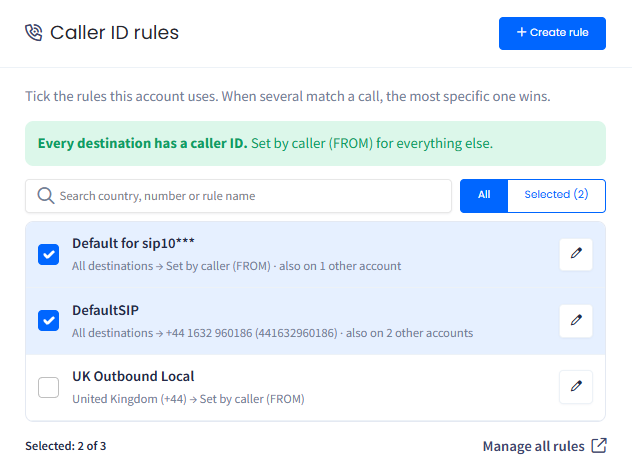
Caller ID rules panel of a SIP account
For the steps, see Caller ID Rules (Dynamic Caller IDs) and Configuring SIP Accounts.
Updated 4 days ago