

How to Handle Phishing and Spam Issues
Beware of fake CommPeak emails from imposters trying to initiate spam or phishing attempts and check them for authenticity.
We have received complaints from our customers about massive amounts of emails being allegedly sent to their mailboxes from CommPeak. Those emails are, in fact, sent by imposters who targeted the commpeak.com brand and domain and are trying to fake our emails for spam/phishing purposes.
As a CommPeak customer, you should be sure that your data is safely stored in our environments under multiple application/hardware-based security protocols and equipment.
CommPeak will always send its emails from addresses under the CommPeak Domain only. Imposters' sending addresses are not official CommPeak addresses; they end in various domain names. Please do not open any links in those emails and do not reply or provide any sensitive data.
Here is a step-by-step guide to viewing email headers to make sure who the original sender is:
Gmail
Sign in to your email
Sign in to your email in a web browser.
Open the email
Open the email for which you want to check the headers.
Open More
Next to Reply, click More, the three vertical stacking dots.
Show the original
Click Show original.

Selecting the Show original option
A page with the email headers will open in a new tab or window. Here, you can see the actual email address that sent the message. If it's not from @commpeak.com, it's fake.
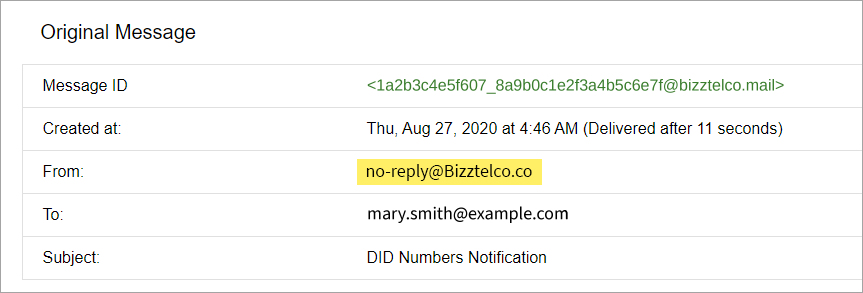
Viewing the actual sender email address
Outlook 365
Open the email
Open an email in Office 365 (Outlook on the web).
Open the message menu
Click on three vertical dots at the upper right corner of the email View > View message source.

Selecting the View message source option
Check the sender domain
Scroll a bit to see the original sender and verify the domain.
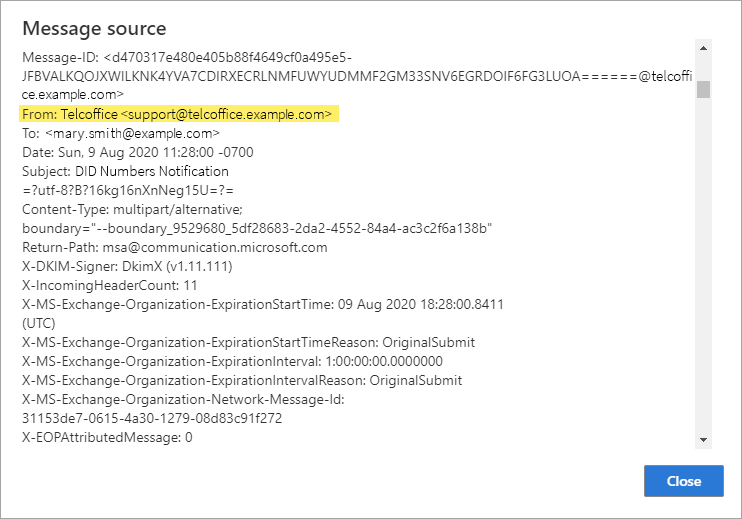
Viewing the original sender email address
Updated 6 days ago