

Domain Pools
Manage domain pools, making it easy to use custom domains in SMS campaigns.
Video tutorial
A domain pool is a set of custom domains you have created. Domains can be grouped into pools for convenient use in SMS Campaign.
You can set a global messaging limit per domain to swap domains in your campaigns automatically.
Creating domain pools
To create a new domain pool:
Create a domain pool
In the Domains & URLs section of the main menu, go to the Domain Pools tab and click Create New Pool. If you haven't created any pools yet, click Create Your First Pool on the empty page.

Empty Domain Pools tab
Name the pool
In the pop-up window that appears, enter the name and description of the new pool.
Add domains
Select the Add domains checkbox to add domains to the pool immediately. Then, choose among the existing domains in the drop-down list.

Create New Pool dialog
Create the pool
Click Create.
At SMS campaign creation, you can select the domain pool when adding a Short URL or Opt-out URL.

Select domain pools option
Adding domains to an existing pool
After you have created a pool, you can add more domains to it. You can do it in two ways.
Option 1:
Open the pool
On the Domain Pools tab, click on the needed pool name in the table.
Select Add Domains
In the pop-up window that opens, select the Add Domains checkbox.

Adding domains to an existing pool
Search for domains
In the box that appears below, start entering the name of the domain you want to add or scroll down the domain list to find it.
Select the domains
Select the checkbox for the needed domain. You can mark as many domains as you need.
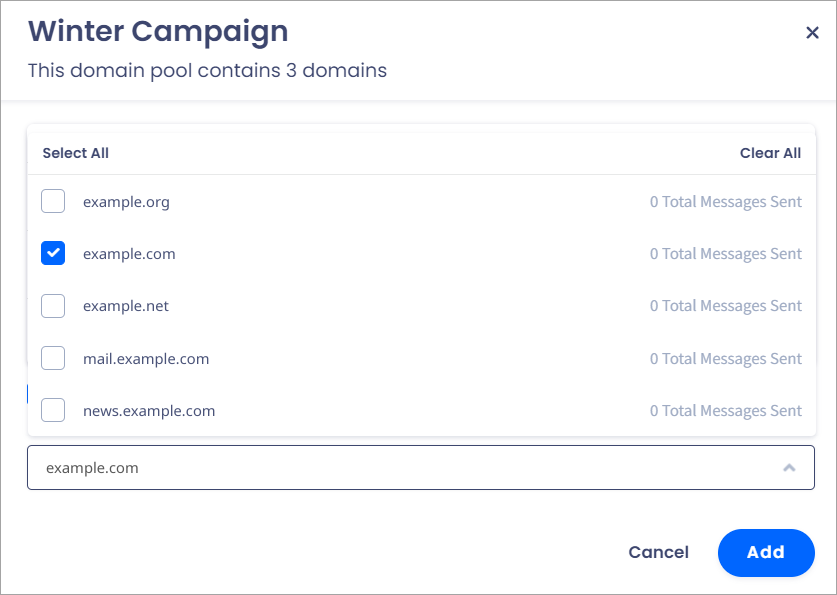
Selecting domains
Add the domains
Click Add at the bottom of the window.
Option 2:
Select the domains
On the Domain Management tab, select the domains you want to add to a pool in the table.
Click Add to pool
Click Add to pool above the table.

Domain Management tab
Choose the pool
In the pop-up window that appears, choose the needed pool in the drop-down list.

Add domain to pool dialog
Add the domains
Click Add.
Deleting domains from a pool
To remove domains from an existing pool:
Open the pool
Click on the domain pool name.
Remove the domain
Click on the trash icon next to the needed domain.

Deleting domains from a pool
Close the window
Click Close.
Updated 6 days ago