

Messaging Services
Set up and manage CommPeak messaging from the Portal: campaigns, channels, OTP, SMPP connections, rates, and delivery reports.
The Messaging section of the CommPeak Portal is where you set up and manage CommPeak messaging: SMS routes and API tokens, campaigns, one-time passwords, SMPP connections, rates, and delivery reports. Campaigns, channels, and OTP configurations live in TextPeak, and the Portal pages open them for you.
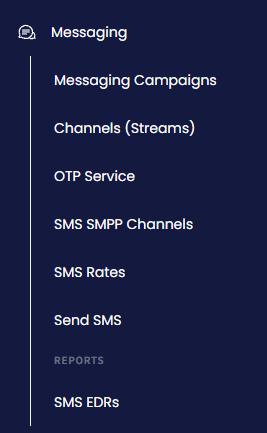
Messaging menu tabs
From the Messaging menu, you can:
- Run campaigns: see your recent SMS and WhatsApp campaigns in Messaging Campaigns, and open TextPeak to build, schedule, and track them.
- Manage channels and API tokens: create, edit, and reset SMS stream tokens and restrict them by IP address in Channels (Streams).
- Send and verify one-time passwords: get an API token and the two requests you need for OTP over SMS, WhatsApp, and Voice in OTP Service.
- Connect over SMPP: set up password-protected SMPP channels in SMS SMPP Channels.
- Test routes before going live: send a test message and copy a ready-made HTTP request in Send SMS, and look up per-country rates in SMS Rates.
- Review delivery: filter, chart, and export the records of your outbound messages in SMS EDRs.
TIPTextPeak is the CommPeak messaging platform for campaigns, channels, and the shared TextPeak Inbox, which collects SMS, WhatsApp, Telegram, Email, and WebChat conversations in one place. To open it, click Open in SMS Platform on the Messaging Campaigns, Channels (Streams), or OTP Service page.
For setup guides and reference, see the pages below:
Activate messaging services and choose between TextPeak, the Streams API, and SMPP channels.
Manage campaigns, channels, OTP, SMPP channels, test messages, and delivery reports in the Portal.
Automate your messaging workflows with CRM, e-commerce, and automation integrations.
Answers to common questions about CommPeak messaging services.
Causes and fixes for common messaging setup and delivery issues.
Updated 18 days ago